Blackmagic ATEM Mini Extreme ISO G2
 Blackmagic
EAN:9338716009965
₦ 3,675,489.93
VAT Included
VAT Included
Available in 15 days
Variants
4ch HDMI Live Switcher with encoding capabilities
₦ 709,184.78 + VAT
4ch HDMI Live Switcher with encoding capabilities, and ISO recordings
₦ 905,642.17 + VAT
4ch HDMI Live Stream Switcher streaming in + Monitor 15,6" IPS multiview KIT
₦ 1,584,490.35 + VAT
4ch SDI Live Stream Switcher
₦ 601,145.78 + VAT
4-Input SDI Digital Video Mixer with Built-In Streaming Encoder
₦ 1,344,148.65 + VAT
8ch HDMI Live Switcher,Streaming Encoder,USB webcam output, Program Rec(H.264)
₦ 1,912,311.00 + VAT
8ch SDI Live Switcher,Streaming Encoder,USB webcam output, Program Rec(H.264)
₦ 2,561,851.20 + VAT
Blackmagic 8 HDMI input switcher with built in multi view streaming engine, Thunderbolt for recording and playback, USB webcam out, DVE, chroma key, media player and ISO recording for each of the 8 video inputs
ATEM Mini switchers make it easy to create professional multi camera productions for live streaming to YouTube, business presentations using Zoom or Teams.
You can switch between up to 8 camera inputs with much better image quality, plus the built in DVE gives you picture in picture for commentary.
ATEM Mini includes a huge range of video effects and amazing broadcast features for high end work, plus support for SRT streaming for the lowest latency and secure transmission.
You can even sync recordings to the Blackmagic Cloud so you can edit live productions in DaVinci Resolve from anywhere!
Faster Video Production and Live Streaming
Live production is the fastest way to get your program done and then share it live to YouTube with the world.
ATEM Mini features a hardware streaming engine that supports RTMP and SRT protocols so you can go live to all major platforms, without the need for separate streaming software!
Depending on the model, ATEM Mini has up to 8 HDMI inputs so you can switch between different camera angles, such as medium shots and close-ups.
You can even use the HDMI connection to connect a computer to show PowerPoint slides, websites, or a video game console.
It's a true mini broadcast studio!
All in One Broadcast Quality Switcher
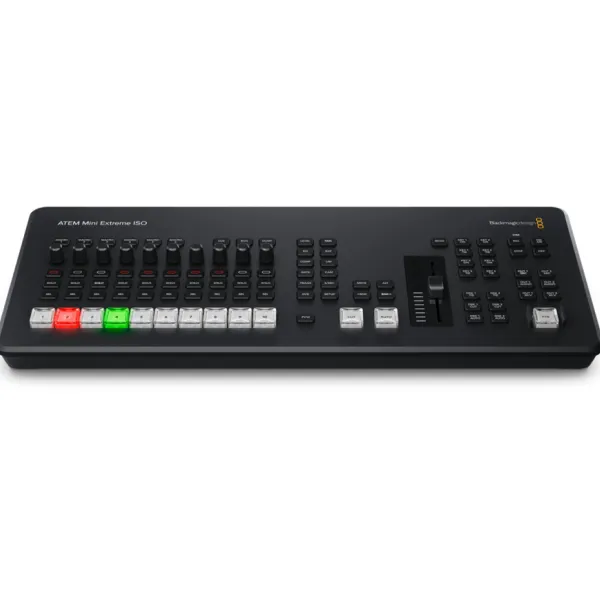
ATEM Mini's compact all in one design features a front panel control panel as well as connections on the rear panel.
The front panel features dedicated buttons for selecting sources, video effects and transitions. The source buttons are large so they're easy to feel, so the presenter can switch between them directly!
There are even buttons for mixing audio and for recording and managing streaming, and for selecting the camera, program or multiview on the video output.
On the back there are HDMI connections for cameras, computers and game consoles, additional microphone inputs, a USB webcam output and an HDMI aux output for the program video.
Connect eight cameras
With 4 or 8 HDMI inputs depending on the model, you can connect as many cameras as you want to show.
Camcorders with HDMI outputs are better than simple webcams because they use high-quality lenses and offer greater sensitivity in low light.
The switcher re-syncs sources that have different video standards than its own, so you can connect any device without worrying about whether it will work!
Plus, HDMI cameras often support interchangeable lenses, ideal for switching between wide angle and zoom models for close-ups.
Imagine using cameras with excellent light response for theater productions, weddings, school concerts or music videos!
HDMI Video or USB Webcam
For maximum compatibility, all ATEM Mini models feature a USB connection that works like a webcam.
This means you can plug in a computer and work with any video software!
The software will detect ATEM Mini as a webcam, even though it is a live production switcher.
That means you get full compatibility with any video software, plus full 1080 HD quality.
Now you can reinvent your presentations in software like Zoom or Microsoft Teams with professional, broadcast quality multi-camera production!
The ATEM Mini webcam output also works with streaming software such as Open Broadcaster and XSplit Broadcaster.
Live via Ethernet
With a built in hardware streaming engine and simple ethernet connection, ATEM Mini lets you go live live to YouTube, Facebook and Twitch without the need for a computer. You can stream high quality content to YouTube, Facebook and Twitch with no dropped frames and with easy setup.
Simply select the streaming service you want, enter the code and you're done!
ATEM Software Control provides setup menus and streaming status on the multiview.
Data rate displays the required internet speed based on the video format being used.
With the right technical knowledge you can also edit streaming settings in an XML file to add additional services.
ATEM Mini switchers make it easy to create professional multi camera productions for live streaming to YouTube, business presentations using Zoom or Teams.
You can switch between up to 8 camera inputs with much better image quality, plus the built in DVE gives you picture in picture for commentary.
ATEM Mini includes a huge range of video effects and amazing broadcast features for high end work, plus support for SRT streaming for the lowest latency and secure transmission.
You can even sync recordings to the Blackmagic Cloud so you can edit live productions in DaVinci Resolve from anywhere!
Faster Video Production and Live Streaming
Live production is the fastest way to get your program done and then share it live to YouTube with the world.
ATEM Mini features a hardware streaming engine that supports RTMP and SRT protocols so you can go live to all major platforms, without the need for separate streaming software!
Depending on the model, ATEM Mini has up to 8 HDMI inputs so you can switch between different camera angles, such as medium shots and close-ups.
You can even use the HDMI connection to connect a computer to show PowerPoint slides, websites, or a video game console.
It's a true mini broadcast studio!
All in One Broadcast Quality Switcher
ATEM Mini's compact all in one design features a front panel control panel as well as connections on the rear panel.
The front panel features dedicated buttons for selecting sources, video effects and transitions. The source buttons are large so they're easy to feel, so the presenter can switch between them directly!
There are even buttons for mixing audio and for recording and managing streaming, and for selecting the camera, program or multiview on the video output.
On the back there are HDMI connections for cameras, computers and game consoles, additional microphone inputs, a USB webcam output and an HDMI aux output for the program video.
Connect eight cameras
With 4 or 8 HDMI inputs depending on the model, you can connect as many cameras as you want to show.
Camcorders with HDMI outputs are better than simple webcams because they use high-quality lenses and offer greater sensitivity in low light.
The switcher re-syncs sources that have different video standards than its own, so you can connect any device without worrying about whether it will work!
Plus, HDMI cameras often support interchangeable lenses, ideal for switching between wide angle and zoom models for close-ups.
Imagine using cameras with excellent light response for theater productions, weddings, school concerts or music videos!
HDMI Video or USB Webcam
For maximum compatibility, all ATEM Mini models feature a USB connection that works like a webcam.
This means you can plug in a computer and work with any video software!
The software will detect ATEM Mini as a webcam, even though it is a live production switcher.
That means you get full compatibility with any video software, plus full 1080 HD quality.
Now you can reinvent your presentations in software like Zoom or Microsoft Teams with professional, broadcast quality multi-camera production!
The ATEM Mini webcam output also works with streaming software such as Open Broadcaster and XSplit Broadcaster.
Live via Ethernet
With a built in hardware streaming engine and simple ethernet connection, ATEM Mini lets you go live live to YouTube, Facebook and Twitch without the need for a computer. You can stream high quality content to YouTube, Facebook and Twitch with no dropped frames and with easy setup.
Simply select the streaming service you want, enter the code and you're done!
ATEM Software Control provides setup menus and streaming status on the multiview.
Data rate displays the required internet speed based on the video format being used.
With the right technical knowledge you can also edit streaming settings in an XML file to add additional services.
Accessories for ATEM MINI EXTREME ISO G2
Cards and Storage media - Cfast Cards
SanDisk - 256GB Extreme PRO Cfast 2.0 Memory Card (Canon and BlackMagic Cameras)
₦ 942,935.18
VAT Included
VAT Included
SanDisk - 512GB Extreme PRO Cfast 2.0 Memory Card (Canon and BlackMagic Cameras)
₦ 1,458,803.92
VAT Included
VAT Included
Cards and Storage media - Cfexpress Type B
Lexar - Professional GOLD Cfexpress™ 4.0 Type B Card, 1 TB , R: 3600MB/s , W: 3300MB/s
₦ 919,578.19
VAT Included
VAT Included
Lexar - Professional GOLD Cfexpress™ 4.0 Type B Card, 2 TB , R: 3600MB/s , W: 3300MB/s
₦ 1,537,115.14
VAT Included
VAT Included
Lexar - Professional GOLD Cfexpress™ 4.0 Type B Card, 512GB , R: 3600MB/s , W: 3300MB/s
₦ 644,815.61
VAT Included
VAT Included